
To send an automatic DM when someone comments on your Facebook Page, you need a tool that uses Meta’s private replies: an automation watches the Page’s new comments for a word such as PRICE, and each person who writes it gets one Messenger message from your Page. Meta allows one private reply per comment, within 7 days of the comment, and you can only send more after the person answers. In VivaDialog it is the same automation as on Instagram, with your Facebook Page as the channel.
What Meta allows on a Facebook Page
Private replies are part of the Messenger Platform, and Meta sets the rules. From Meta’s Messenger private replies documentation:
- One private reply per comment, sent to the person who wrote it.
- Within 7 days of the comment.
- The conversation continues only after they respond. Until the person answers your DM, you cannot send them a second message.
Instagram works the same way, with a few differences in where the message lands. How to send an automatic DM when someone comments on Instagram covers that side.
What you need first
- A Facebook Page connected in VivaDialog. You need to be an admin of the Page on Facebook, and an owner or admin of the VivaDialog workspace. How to connect your Facebook Page has the steps.
- Every permission left on when Facebook asks. Sending private replies uses the Page’s messaging permission; Facebook and Instagram permissions explained lists what each one is for.
Set up the automation
- Open Automations and click New rule on the Rules tab.
- Pick Comment INFO, get the details by DM and click Use this. It posts a short public reply under the comment and sends the details by DM. If you would rather not reply in public, pick Comment LINK, get the link by DM only.
- Under What starts this automation?, keep New comment.
- Under Which messages?, choose Messages with certain words and type the words people should comment, separated by commas. One matching word is enough, and capital letters do not matter.
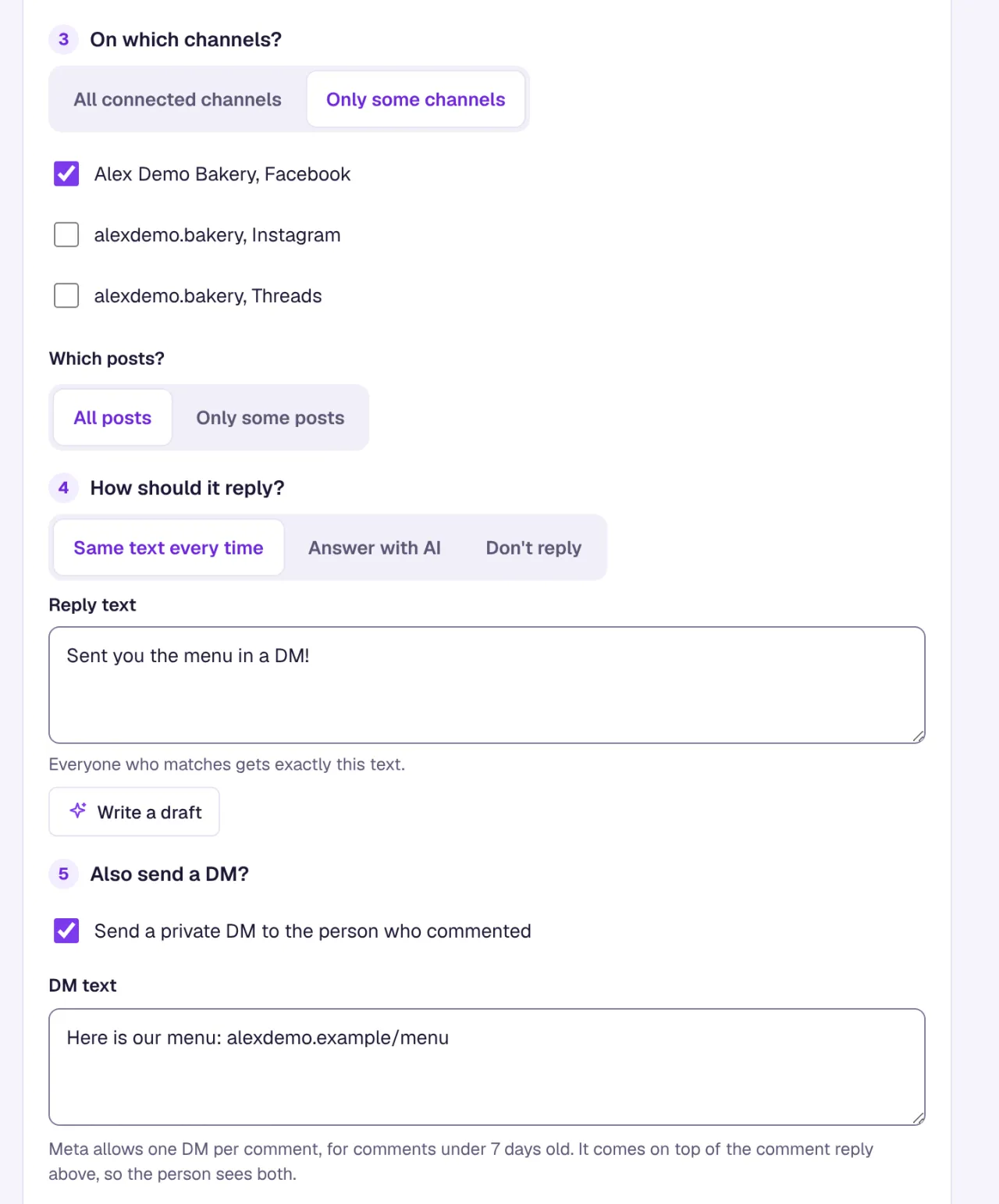
- Under On which channels?, choose Only some channels and tick your Facebook Page. Leave All connected channels if the same keyword should work on Instagram too.
- Under How should it reply?, keep the short public reply, or choose Don’t reply to send only the DM.
- Under Also send a DM?, tick Send a private DM to the person who commented and write the message. Replace the text in square brackets with your own link or offer; the rule cannot be saved while a placeholder is left.
- In Test it first, type a comment the way a customer would and click Test. Nothing is sent and no quota is used.
- Click Save rule. Leave Turn on right after saving ticked to start right away.
Matching looks for the word anywhere in the comment, so info also matches “information”. If a short word catches too much, pick a less common word for the post, or use Use an advanced pattern (regex) instead of words under Advanced settings.
To run the automation on one post only, such as a giveaway or a product launch, use Which posts? and choose Only some posts. The list shows posts that got a comment in the last 30 days.
Send the DM by hand instead
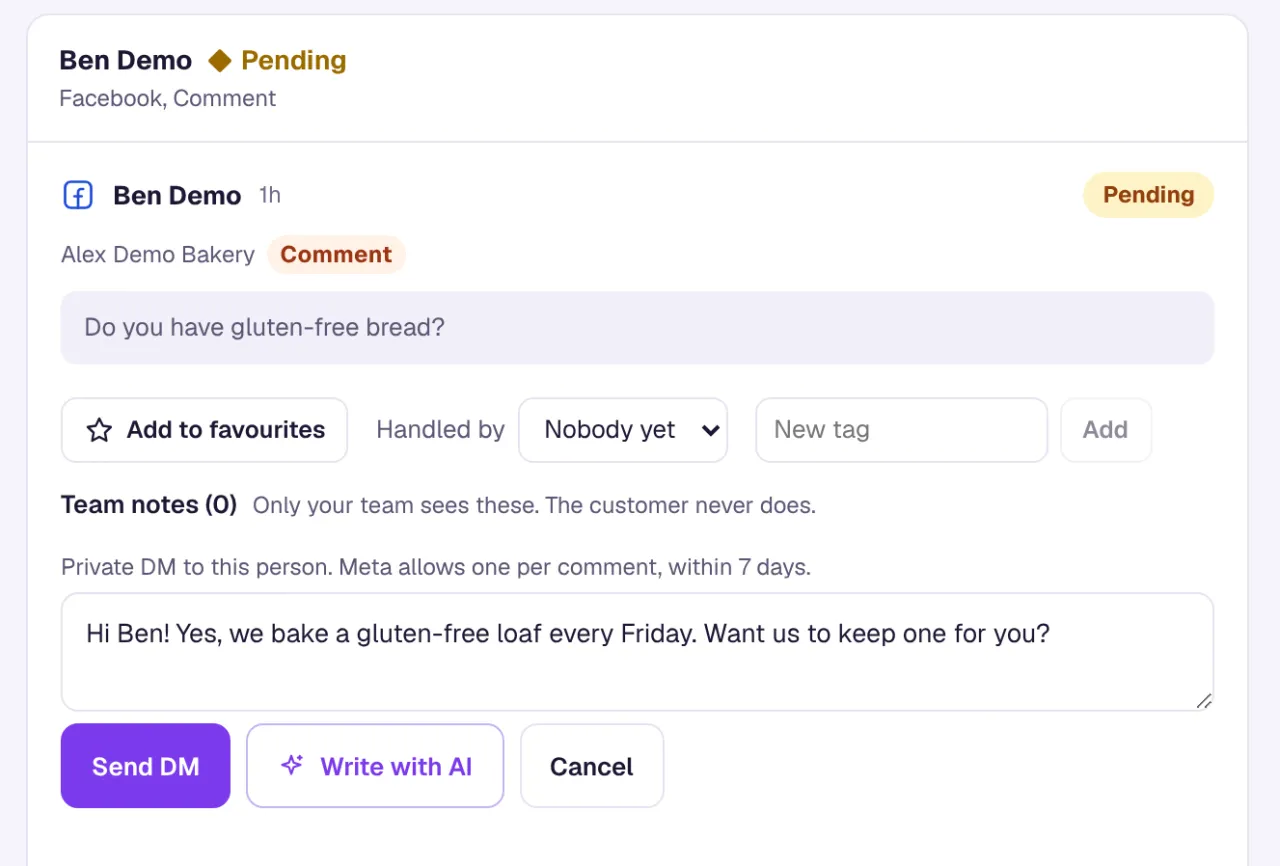
For a one-off, open the comment in the VivaDialog inbox, click Reply by DM, write the message, and click Send DM. Meta’s limits are the same: one DM per comment, within 7 days. If the 7 days have passed, the inbox says it is too late for a DM on this comment.
What VivaDialog adds on top of Meta’s limits
- One DM per comment, even when several automations match the same comment. A second attempt shows “A DM was already sent for this comment (Meta allows one)” in the automation’s History.
- Nothing older than 24 hours gets an automatic reply or DM, so an automation never works through a backlog of old comments. You can still send a DM by hand up to Meta’s 7 days.
- Your own Page never triggers an automation. Replies the Page posts come back as comments, and they are left alone.
A DM sent for a comment counts as the same conversation as the comment in your monthly quota. If the person then writes back and an automation answers them in Messenger, that DM thread counts as a conversation of its own. What counts as a conversation has the details.
After the person answers
Their reply arrives in the VivaDialog inbox with your other Messenger DMs. From then on the normal messaging window applies: you can reply within 24 hours of their last message. An automation can also send one reminder later in the same conversation, from 30 minutes to 23 hours after their message, and it is cancelled if they write again first. The template Price question, with a reminder 2 hours later shows how it works.
A first DM that gets an answer
Because you get one message before the person replies, write it so it is useful on its own:
- Send what the post promised, such as the price list or the booking link.
- Keep it to one or two sentences and one link.
- End with a question they can answer, such as which date or size they need. Their answer opens the 24-hour window for you to continue.
Say on the post what to comment and that the details come by DM, so the message is expected when it arrives. For every option in the rule editor, see how automations work, or browse ready-made rules in the template gallery.