
Once 24 hours have passed since a customer’s last Instagram DM, a business tool that sends through Meta’s API usually cannot reply until the customer writes again. Meta documents two exceptions. A conversation that started from a Click-to-Direct ad can stay open for up to 7 days, and the Human Agent tag lets a person on your team, not an automation, reply up to 7 days after the customer’s last message, if the tool has Meta’s approval for it. VivaDialog does not use the Human Agent tag today, so in VivaDialog the 24-hour limit applies to every reply, by hand or automatic.
How the window opens and why comments are different is in the 24-hour window explained. This article is about what you can still do once it has closed.
The two exceptions Meta documents
Ads that start a conversation. Meta’s messaging policy overview says that when someone sends their first message after tapping a Click-to-Messenger or Click-to-Direct ad, the window can last up to 7 days from that message. This only applies to conversations that began from such an ad.
The Human Agent tag. Meta’s Messenger Platform and Instagram Messaging API policy and the Instagram Platform overview describe a tag that marks a message as written by a person. With it:
- a person on your team can reply by hand up to 7 days after the customer’s last message;
- it is meant for conversations that need a member of staff, not for automatic replies;
- like other message tags, it may only be used for its approved purpose, and not for promotional content such as offers, coupons or discounts;
- the app sending the message must request the Human Agent permission from Meta and be approved before it can use the tag.
Meta also says that using a tag outside its approved use can limit the Page’s or Instagram account’s ability to send messages.
So the tag does not stretch the window for automations. A tool that sends automatic replies with it is outside Meta’s rules.
What VivaDialog does after 24 hours
VivaDialog sends every DM as an ordinary reply, without a message tag, and it has not requested the Human Agent permission from Meta. In practice:
- Replies you write in the inbox after the window has closed are not sent. The inbox shows that the reply was not sent, because Instagram only lets you reply within 24 hours of the customer’s last message.
- Automations never answer a DM older than 24 hours. If Meta refuses a reply because the window closed, the automation’s History shows “Outside Meta’s 24-hour messaging window.”
- Reminders an automation schedules are limited to 23 hours after the customer’s message, and they are cancelled if the window closes first.
- Conversations from Click-to-Direct ads: the inbox does not check the time itself before sending a reply you wrote. Meta decides whether the conversation is still open, so a reply inside an ad’s longer window can go through.
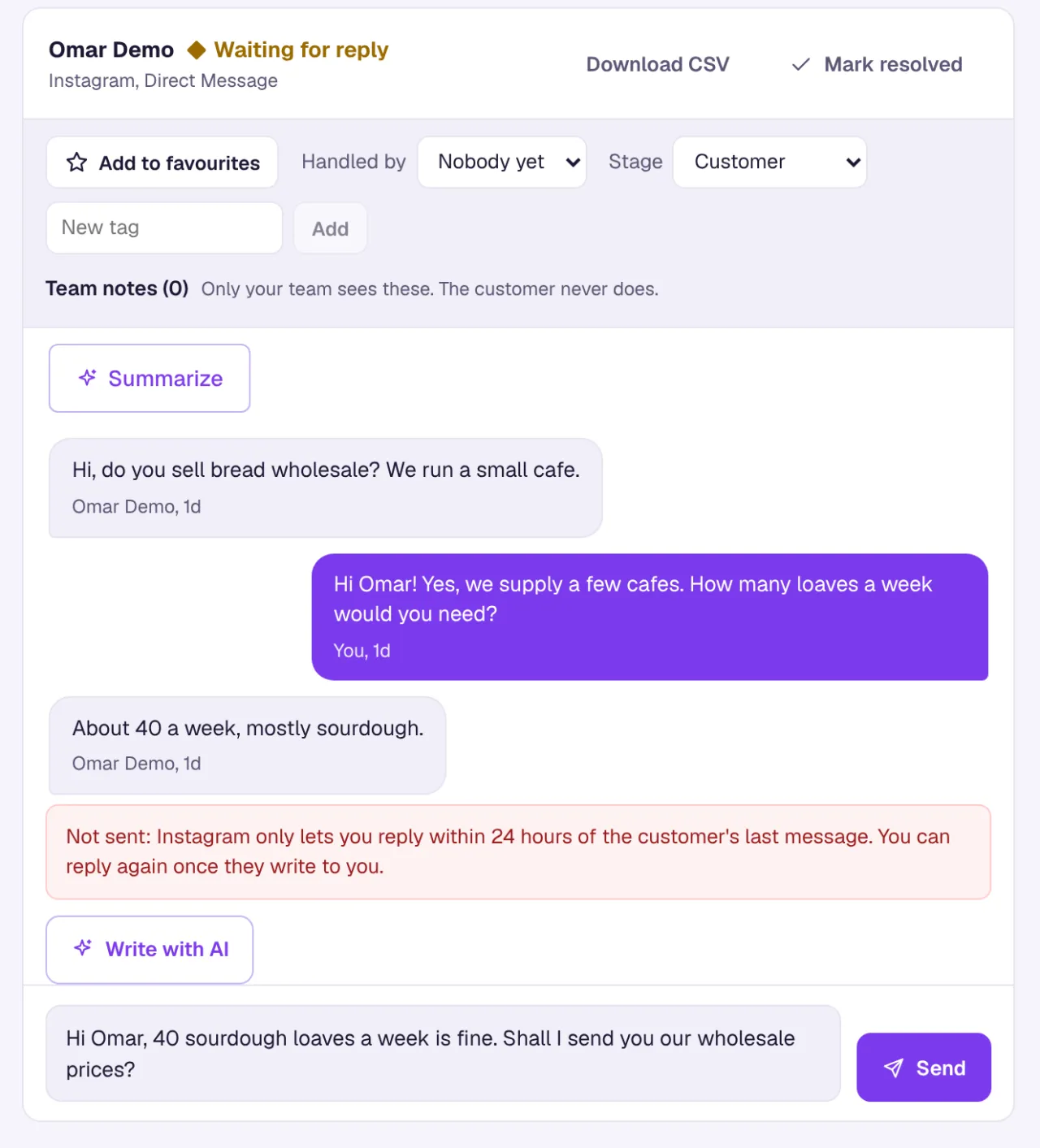
When the customer writes again, a new window opens and you can answer as usual.
Keep DMs from reaching 24 hours
With a 24-hour limit and no tag, the useful work happens before the window closes.
- Turn on notifications. VivaDialog can notify you on your computer or phone for every new DM, or only for conversations assigned to you. See notifications and the home screen.
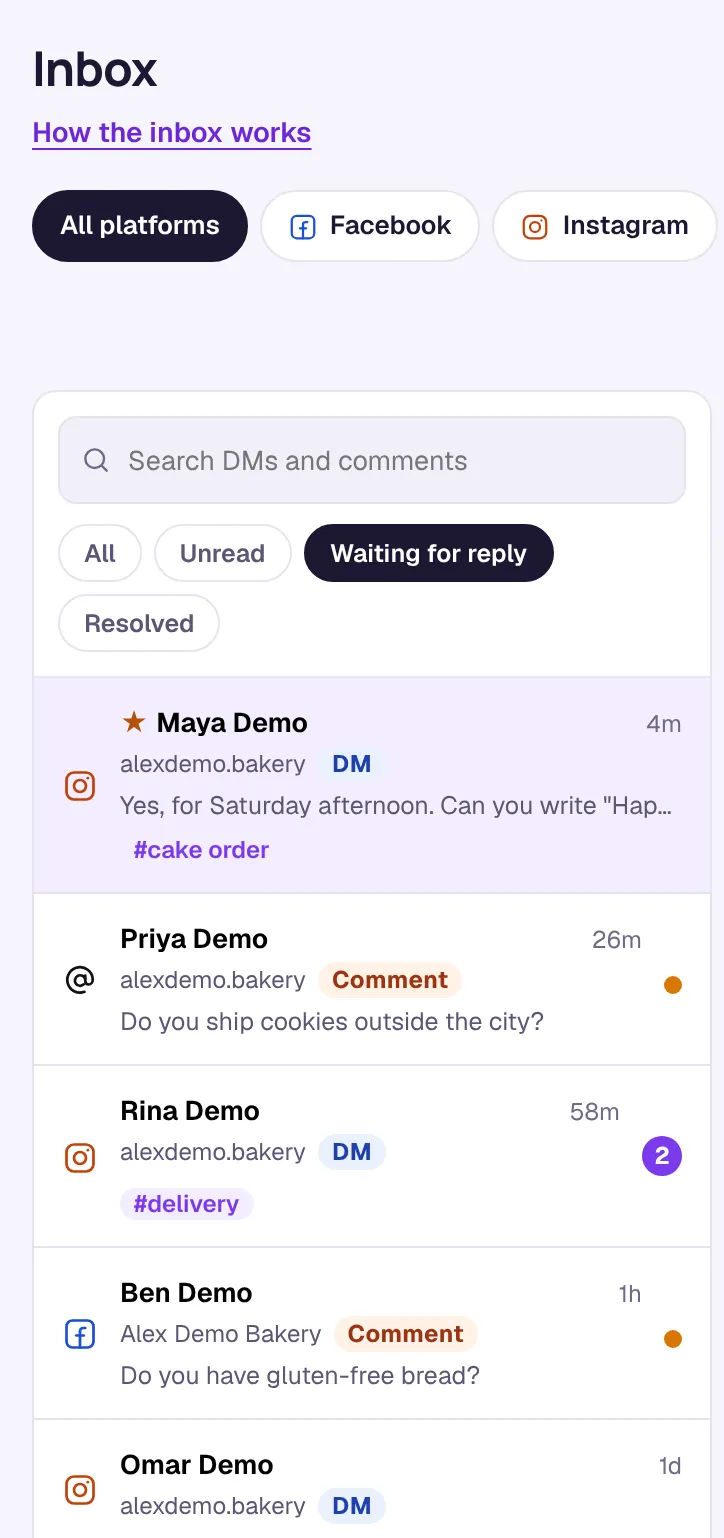
- Use the Waiting for reply filter. In the inbox it lists DMs where the customer wrote last and comments that have no reply yet. On the Analytics page, DMs waiting for a reply counts them, and Open them in the Inbox takes you there.
- Answer outside your hours with an automation. The Away message outside opening hours template replies only when nobody is there. Auto-reply only if nobody answers in 15 minutes waits first and stays quiet if your team answers in time.
- Follow up before the window closes. The Price question, with a reminder 2 hours later template sends one reminder if the customer goes quiet, inside the window.
When the window has already closed
You cannot restart the conversation through VivaDialog. What still works:
- If the customer also commented on a post, you can reply to the comment publicly. A comment reply is not a DM, so the messaging window does not apply to it.
- If the comment is less than 7 days old and has had no private reply yet, you can send one DM for it with Reply by DM. Meta allows one per comment. See how to send an automatic DM when someone comments.
- Make the next post or story easy to answer. When the customer writes again, the conversation is open for another 24 hours.
For everything the inbox can do, see using the inbox.