
To reply to a DM on Instagram, open your messages, tap the conversation, type in the message box, and send. A business that answers through a tool has one extra rule: Meta lets the tool reply only within 24 hours of the customer’s last message. This article covers the steps in the Instagram app, how that 24-hour window works, and how to answer from a shared inbox or with an automatic reply in VivaDialog. The menu names in Instagram change between versions, so where we describe a button we describe what it looks like and does.
Reply to a DM in the Instagram app
- Open Instagram and open your messages. On most versions this is the paper-plane or message icon at the top right of the home screen.
- Tap the conversation you want to answer.
- Type your reply in the message box at the bottom and send it.
Instagram on the web has a messages page too, which is handy if you type more easily on a computer.
Reply to one specific message
If a conversation has several messages and you want to answer one of them, press and hold that message and choose the reply option. Your answer then appears with the original message quoted above it.
Messages from people you don’t know
DMs from people who don’t follow you or whom you haven’t messaged may not appear in your main list. Instagram can place them in a separate area for message requests. Look for it in your messages if a customer says they wrote to you and you see nothing.
The 24-hour window for businesses
Meta’s rule for tools is that a business can reply to a DM within 24 hours of the customer’s last message. After that, the reply is refused until the customer writes again. The same rule applies to automatic replies. The 24-hour window explained covers how the window opens and why comments are different. Replying to Instagram DMs after 24 hours covers the exceptions Meta documents and what you can still do after the window closes.
Reply from a shared inbox
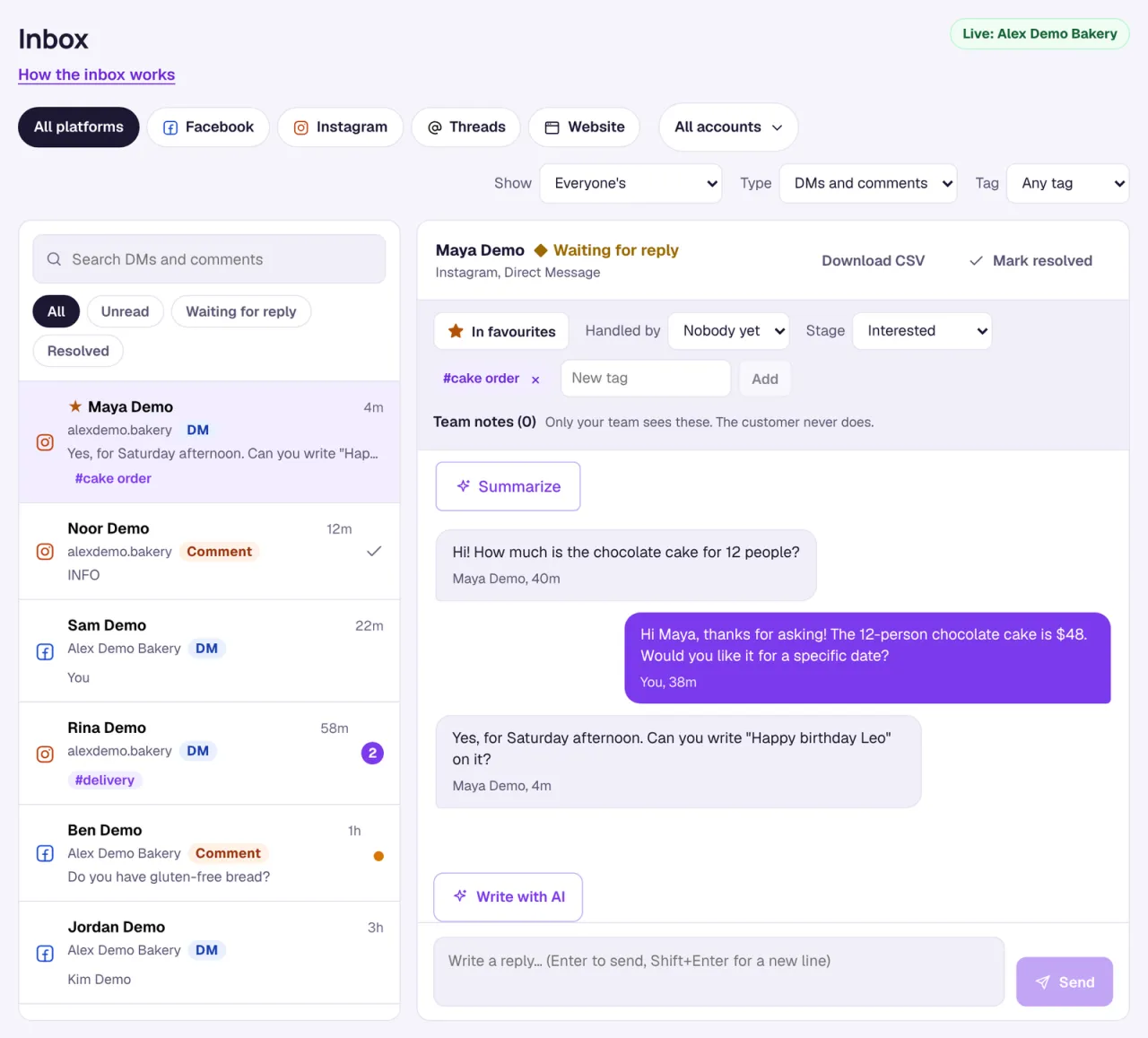
When several people answer the same Instagram account, the app is awkward: everyone logs in to the same place, and nobody can see who is handling what. VivaDialog puts DMs and comments from Instagram, Facebook Pages, Threads, and other channels in one list.
- Connect your Instagram account. It must be a professional account (Business or Creator) linked to a Facebook Page. How to connect your Instagram account has the steps.
- Open the inbox and click a DM. Write your reply and press Enter to send, or Shift+Enter for a new line.
- Click Mark resolved when the conversation is done.
A few things in the inbox save time when a team shares it:
- Waiting for reply lists DMs where the customer wrote last, so nothing sits unanswered.
- Handled by shows who is taking care of a conversation, and Show can narrow the list to Handled by me or Nobody handling yet.
- Tags and Team notes keep context. Only your team sees the notes.
- Write with AI drafts a reply from the conversation. Nothing is sent until you send it, and each draft uses one AI reply from your monthly quota or your own AI key.
Replies you write by hand never count toward your plan’s conversation quota. They are still bound by the 24-hour window. Using the inbox lists everything it can do, and the unified social inbox shows how the channels fit together.
Reply automatically
An automation answers DMs without anyone typing. In VivaDialog you create one under Automations:
- Under What starts this automation?, choose New DM.
- Under Which messages?, choose Messages with certain words and fill in Words to look for, for example
price, how much, cost. Or choose Every message to answer all of them. - Under How should it reply?, pick Same text every time or Answer with AI.
- Use Test it first with a sample message, then turn the automation on.
Three templates cover the common DM cases:
- DM away message answers every new DM with a short note that you will reply soon.
- Away message outside opening hours replies only when nobody is there.
- Any DM question, answered by AI answers from the facts you write into the automation. The AI answers only from those facts, and when the answer is not there it says your team will follow up.
Automatic replies count toward your conversation quota, once per conversation per month. What counts as a conversation has the details. For the wider picture, see the Instagram comment automation guide.
Frequently asked questions
How do I reply to a DM on Instagram?
Open your messages, tap the conversation, type your reply, and send. To answer one message in a longer thread, press and hold it and choose the reply option.
Why can’t I reply to an Instagram DM from my business tool?
If the customer’s last message is more than 24 hours old, Meta refuses the reply until they write again. VivaDialog shows that the reply was not sent.
Can several people reply to the same Instagram account?
Yes, in a shared inbox. In VivaDialog you add team members to the workspace, and each conversation can be assigned to one of them.
Can I reply to Instagram DMs automatically?
Yes. An automation can answer new DMs with fixed text or with AI, based on words in the message or on every message. It replies only inside the 24-hour window.
VivaDialog is in early access right now, and participants get the Growth plan free for 30 days. The pricing page has the details.